Veeva Vault PromoMats Configuration for MLR Cycle Management
Configuration choices in lifecycle, workflow, and roles determine if MLR review takes days or weeks.
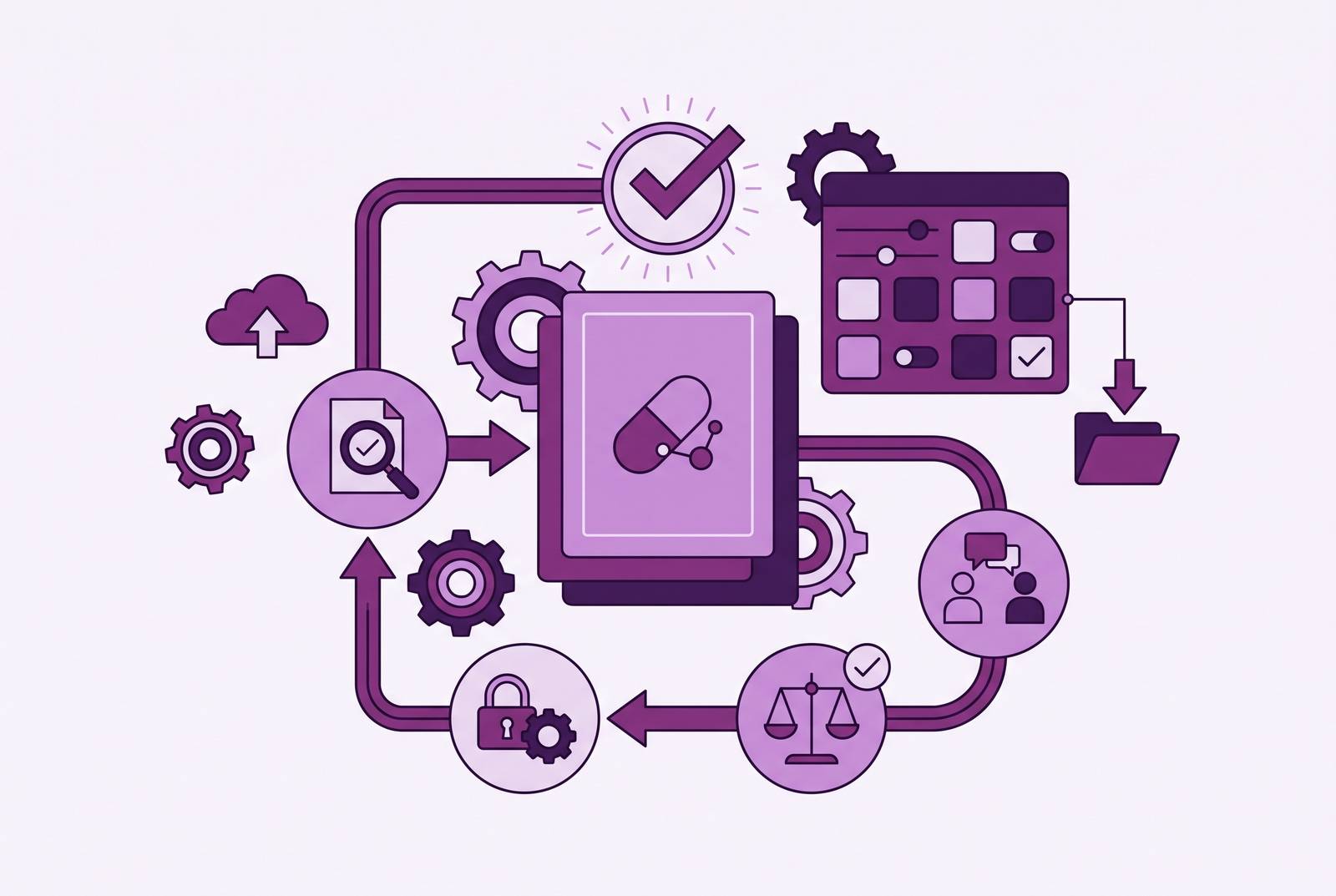
Veeva Vault PromoMats handles the MLR process for most of the industry's biggest drugmakers; Veeva's data shows that when configured right, the platform lets 75% of content clear. Few companies hit that mark. This piece explains why by following the configuration choices, lifecycle states, workflow setup, role assignments, and claims infrastructure that decide if a review takes days or drags into weeks of resubmission purgatory.
The hard truth for those blaming "slow reviewers" in MLR meetings is that reviewers are seldom the issue. The issue often exists in the system long before it's spotted, hidden in state rules and workflow steps nobody checked after launch. Each section below tackles one part of that setup in the sequence teams usually face: lifecycle, workflow, roles, the content structure (claims and modularity) shaping review load, reviewer tools and AI that flag issues early, and last, the regulatory submission that wraps it up.
How document lifecycles and state design set the boundaries of every review
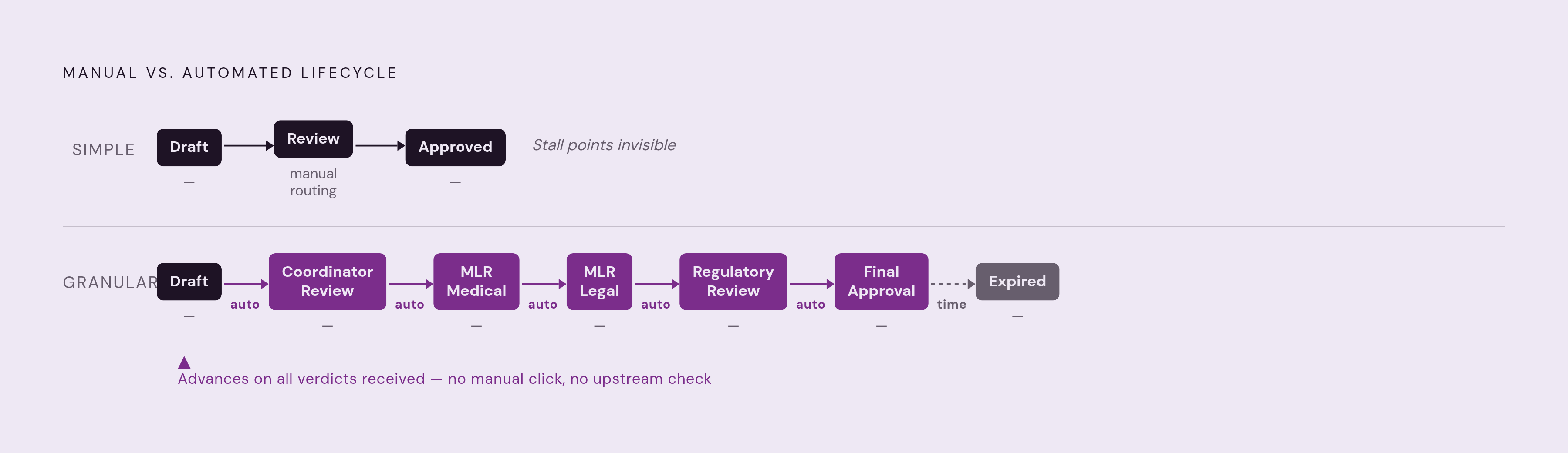
In Vault, a lifecycle defines a document's journey from Draft to Approved (and eventually to Expired or Superseded), with every step having its own permissions, actions, and logic. It's more like a building where doors open only for people with the right badge than a single hallway. It’s what most overlook: the lifecycle does more than log status, it controls who can do what during review.
Simple lifecycles include two or three steps and depend on someone manually clicking "move forward." Complex ones break down every stage, like Coordinator Review, MLR Review, Final Approval, each with its own security settings, and use automatic transitions to advance a document as soon as all required verdicts arrive. This difference is more important than you might think. A lifecycle with too few states lumps distinct work stages together, making it impossible to route documents selectively or track where time is lost. When "review" covers everything, it's unclear if a document is stalled in Medical, Legal, or if someone just didn't submit it.
Granular states fix a specific issue: they make routing logic accurate. The document won't enter "Regulatory Review" until Medical and Legal are finished, and no human needs to check their work beforehand. The system handles the exit in a similar automated way. The system automatically approves the document when all verdicts come in, without needing any manual steps, which seems minor but can mean getting approval Friday instead of Monday if someone's away.
Permissions sit on top of this, and they depend on the state. Only users with the correct role in the appropriate state can view, edit, annotate, or transition a document, making misconfigured permissions a frequent cause of reviewers being unable to access documents when needed. It's a strange holdup: the document and reviewer are both set, but access permission is delayed. Since workflows can only connect to lifecycle states set up to accept them, lifecycle design doesn’t just come before workflow design, it sets the boundaries for it.
Designing workflows that match how Medical, Legal, and Regulatory actually review
PromoMats offers a sequential MLR workflow template: Medical reviews, then Legal, then Regulatory. It’s a sensible standard for most teams. It's not a final product, just an initial template that assumes reviews always happen one after another, which isn't always the case.
You'd use a sequential workflow when one reviewer's decision relies on the previous one. Parallel works when they don’t need to, when Medical and Legal can check the same draft together without clashing. Admins can create either type or mix them, letting some reviewers work together while others go one by one, based on if their decisions truly depend on each other or just follow old routines.
A few settings control how smoothly this works in real use. How tasks are assigned is important: Vault can send a task to every reviewer in a group, or make it an "available task" for one person to claim. With the available-task model, only one Legal reviewer claims a document, preventing duplication of effort when multiple reviewers open it simultaneously. A document can automatically route to another stage based on its metadata, with no human decision required. Multi-document envelopes allow a coordinator to group up to 100 documents into one workflow, handy for a product launch when a sales aid, slide deck, and leave-behind all require review at once but need individual decisions. Verdict logic controls what happens when a reviewer requests changes: the document goes back to its owner with annotations, and once all required approvals are in, the system can mark it as Approved automatically, no final button click needed.
Notification templates finish things up by alerting reviewers automatically, so coordinators don't have to email them repeatedly, truly a thankless task. When workflows are set to "Any Lifecycle" instead of a single lifecycle, admins must map document roles to app roles and set state types, a step often missed at first and that leads to routing errors no one catches right away. Veeva’s 2024 Innovation Guide added formula-based workflow automation, so formulas now fire at creation, decision points, and entry rules, reducing the manual handoffs that once needed a coordinator’s call.
Assigning roles so the right people review the right content without access sprawl
PromoMats groups users into four categories, each with specific limits on what they can access. Agency users can upload, check out, and revise documents but cannot access content outside their assignment. Coordinators handle meeting logistics, start workflows, and keep tasks on track, acting as the operational backbone that prevents the cycle from stalling. Brand managers usually have the Owner role for their materials, granting them the most control. Medical, Legal, and Regulatory reviewers check content thoroughly before it’s sent out or submitted.
Misconfigure any of this and the failure modes are predictable. Reviewers given too many files just waste time on stuff they don’t need to check. Agency users granted coordinator permissions by mistake can kick off workflows they shouldn't be starting. Documents without assigned owners are left with nobody accountable, becoming orphaned files lacking a responsible party.
Veeva's 25R3 update, the Brand Team Security Management feature, tackles this issue at its core. It adds Team, Team Assignment, and Team Member objects to handle role setup and removal automatically when team members change. Before this, admins had to manually update role records when staff changed, which could delay permission updates. If companies configure Brand Teams to match their org chart, they automatically keep roles clean. Companies that don’t do this end up with old permissions piling up like rubber bands in a junk drawer, quietly, unseen, till someone checks and asks what happened.
Designing roles isn't something you do just once. Each new market, brand, or agency partnership alters who's involved and what they need to see, so a setup that worked for one product launch won't necessarily work for the next.
Building a claims library that reduces what reviewers need to evaluate from scratch
Claims face more intense review than nearly anything else in a promotional piece, and that’s because each one must link back to a supporting reference document. PromoMats consolidates claims into a library, handling tagging, reference linking, review, approval, storage, searchability, and retirement within the platform, avoiding the chaos of shared drives and emails.
Automatic claims linking ties a promotional claim to its right reference without manual tagging, doing two things at once: it speeds up proofing and stops orphaned claims, those floating without their evidence, from happening. Vault tracks changes to claims and their anchors in version history, not as a perk, but as the system's compliance foundation.
The latest updates have improved this even more. 25R3’s Auto-Link PreLaunch Claims keeps early claims tied to early docs, so later edits slide in once the real label lands. With Claims Commenting for Review and Approval, also 25R3, reviewers get a dedicated space to discuss a claim directly, seeing prior discussion in context rather than searching through an email chain. OCR for Images in PowerPoint and Word, introduced in 25R2, lets the system find and auto-link text inside images, fixing the problem where claims in screenshots or charts were completely missed.
Veeva reports PromoMats clients achieving up to 70% claim reuse rates post-implementation. Once you understand it, the reasoning is simple: a solid claims library ensures most new content is already approved, letting reviewers focus only on new parts rather than rehashing claims proven valid months earlier. Teams that build the library early see growing benefits over time. Skipping the library means teams must recreate the same justification for each new item, effectively reinventing a wheel already at hand.
How modular content configuration shifts MLR load from documents to components
In PromoMats, modular content has a specific meaning: it's a pre-approved content piece with its own material number and rules that dictate its use. It’s not a template. A reusable, governed unit containing its approval status.
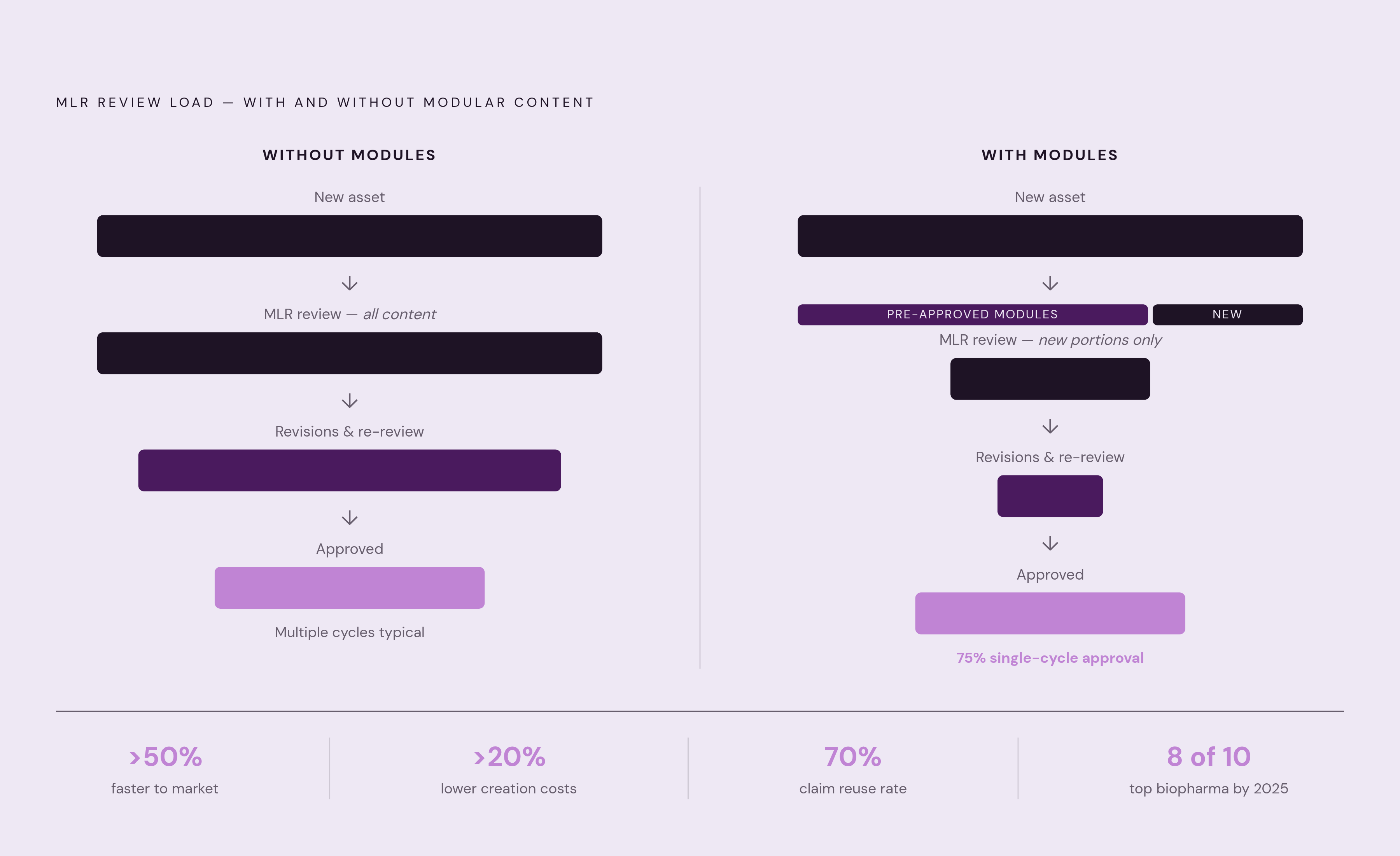
The MLR consequence follows directly. Each module is pre-approved, reducing the need for repeated review of the same content. Each new asset built from pre-approved modules reaches MLR with most content already cleared, so reviewers only see what’s truly new or altered. This approach is credited with over 50% faster average speed to market, over 20% lower content creation costs, and a 75% single-cycle approval rate mentioned earlier. It's part of Vault PromoMats, no extra license needed, so that's one less reason not to set it up.
It takes a few specific steps to get there. The process begins with the claims library mentioned earlier, as claims serve as the core components from which modules are built. Next, you need to define module types, such as text blocks, images, and data charts, and the rules for combining them. Set up Text and Digital Asset Management so reusable text and media stay in one searchable library, not in random folders. Modules need separate lifecycle states, tracked apart from the documents that use them, so their approval status isn't mixed with the asset's status.
By Veeva's account, half of biopharma commercial content is modular by 2025, with 8 of the top 10 biopharma companies using Vault PromoMats for modular content specifically. Companies that still build every asset from scratch are missing out on efficiency and falling behind the industry's standard way of working. Vault’s 2024 Created From Document Relationship tool spots copied content the moment it’s made, letting reviewers spot the link to an approved piece right away and adjust their check.
Reviewer experience features that reduce rework within a review cycle
Even with a perfect lifecycle and smooth workflow, reviews can still take three or four rounds if reviewers keep checking content that’s hardly different from before. These features aim to fix that exact problem, and they're mostly coming in 2025.
The 25R1 Similarity Score measures the difference between two documents, enabling teams to route them by tier: minor edits receive a quick review, while major rewrites undergo a thorough one. Auto-Bring Forward Annotations, also 25R1, automatically moves past annotations, text assets, and resolved notes into a new version, keeping accepted and auto-linked claims intact so feedback doesn’t need to be reapplied by hand. The Document Readiness Panel, from 25R2, offers visual checklists to confirm a document is complete before routing, preventing substantiation gaps from unfinished OCR that reviewers discover only after spending time. The same release also includes a feature that stops manual bring-forward actions and suggested links from being used until OCR processing is done.
None of this activates automatically. These features require configuration, and since Veeva released over 40 PromoMats updates in 2024, teams not monitoring release notes might overlook tools that could skip a full re-review cycle. Keep in mind: each change request from a reviewer extends the cycle by a round trip, and these tools help by cutting down the root causes, like incomplete docs, unclear versions, or outdated comments, that lead to those requests.
AI-assisted review and what the Quick Check Agent and Content Agent change about pre-submission quality
PromoMats added Vault AI in 25R3, giving the platform its first AI tools focused on the MLR process. Two parts of it deserve separate attention.
Before formal MLR review, the Quick Check Agent checks promotional content against editorial, brand, market, channel, and compliance guidelines. It flags typos, grammar mistakes, banned terms, and missing safety details, stuff that shouldn’t waste a Regulatory reviewer’s time but often has. The Content Agent works differently: it gives reviewers real-time answers and guidance during the review, so they can get clarity without leaving the review environment to check elsewhere.
Veeva has announced more agents will arrive in future releases, including one for claims management and others tailored to specific reviewer roles, all designed to reduce manual work for MLR reviewers even more. Veeva highlights Moderna as an early adopter collaborating with them on this AI-driven transformation.
These tools don’t work right away without setup. They must be set up with the company’s real guidelines, brand rules, and market or channel limits. A general setup catches common issues like spelling and basic grammar, yet it overlooks specific company operations, somewhat defeating its aim. This just moves one kind of review earlier: from a manual MLR gate to an automated check before submission. Organizations that set the Quick Check Agent up with exact guidelines speed up their MLR cycles by sending documents through with fewer errors, not by hurrying reviewers. This requires matching the agent's rules to the prohibited phrases and safety language listed in the organization's SOPs. Unaligned, the agent risks approving errors a human would immediately spot, making it worse than no tool.
Regulatory submission configuration and the compliance infrastructure that closes the cycle
After passing MLR, U.S. submissions require FDA Form 2253, and PromoMats creates it via a user-started process, ensuring approved items don't miss formal submission.
The eCTD Compliance Package binder template follows FDA's latest guidance for eCTD Module 1 submissions. Vaults set up after V15 already include the needed Form 2253 fields, objects, and mappings. Older Vaults can enable features to automatically set up the same configuration instead of manually creating field mappings.
First-time configurations often stumble on one key point: PromoMats doesn't send the Compliance Package straight to the FDA. The package must go through its own review and approval steps inside Vault before being exported to a different publishing tool for submission. It’s easy to miss this step in the initial setup, as it feels like the process should end there, content approved, form generated, finish line in sight. It’s not quite. The submission step is its own critical part of the compliance setup, and missing it in the initial plan often leads to a last-minute rush when it’s time to file.